Everyone Can Code Projects: Introducing coding and app development 日日av拍夜夜添久久免费 to your students
12/09/23
For instance, the newly published Everyone Can Code projects make it especially easy to teach coding as they are step-by-step instructions. In fact, they are designed with novice coding teachers in mind and provide a structured approach to teaching coding. Furthermore, the web format is easy to share and includes a project presentation in Keynote, which also serves as a student workbook. Certainly, these projects empower students to design and build their first apps with Swift Playgrounds while honing their problem-solving skills and nurturing their creative abilities.
4 Everyone Can Code Projects
Everyone Can Code Projects consist of four lessons tackling a different set of fundamental coding skills.
-
Design a Simple App
This project guides students to create a simple app prototype in Keynote for anything they can dream of. By linking slides and putting the Keynote presentation in Links-only mode, they can make the Keynote presentation appear as an app on their device.
At the core of this lesson is a rapid prototyping activity. In this activity, students get five opportunities to sketch the main view of their app.
This activity aims to get students to think beyond their first instincts and to develop more than one initial idea, hopefully producing more creative-looking apps. At this stage it is not about the details.
You can see a rapid prototyping example here from NameLog: an app that will record audio snippets of the pronunciations of your acquaintances’ names.
2. Build with Stacks and Shapes
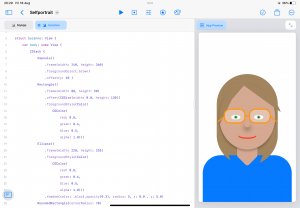
Check out my self-portrait here.
After this activity, you can take what your students have learned further by letting them add the shapes and elements needed to build their designs from the
3. Design an App Icon
This project lets students apply design principles to create a memorable icon for their app.
Moreover, this lesson also incorporates the rapid prototyping activity, letting students quickly jot down six ideas in 10 minutes. They can then use the shapes in Keynote to construct their app icon. Students can do this activity after they have created their own app. However, it can also be a creative activity to apply their learning from a different subject. What apps would Cleopatra, Darwin, or Louis Armstrong have used? Or look at how symbols have been used to communicate ideas since antiquity, and how this relates to user interface design.
4. Build Custom Shapes
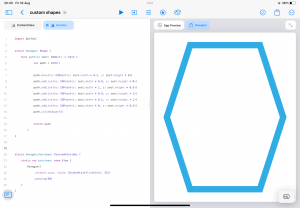
This project lets your students take their app interface to the next level by coding custom shapes with SwiftUI. In the previous activity, students learned how to use the built-in shapes: circle, rectangle, ellipse, rounded rectangle, and capsule. But what if you would like to use a different shape? for instance, in this activity, students plot the coordinates to create a custom responsive 2D shape, such as a hexagon, triangle, or an hourglass.
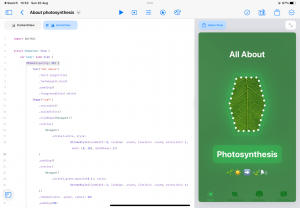
Students work on this activity in the About Me
An obvious curriculum link for this activity is mathematics, as they learn about coordinates, 2D shapes, and responsive design. The About Me activity, however, can be adapted to any subject as About Me can become About Photosynthesis, About Lord of the Flies, or About Greenland.
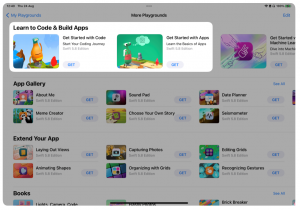
Before starting the Everyone Can Code projects, I recommend that students complete the Get Started With Code and Get Started With Apps walkthroughs in the Swift Playgrounds app. These initial projects will provide them with the fundamental coding knowledge of Swift and SwiftUI.
The Everyone Can Code projects are a great way to introduce your students to coding and app development. Would you like to see them in action? Next week, I will take you through the first two projects in two online seminars. Sign up here and join us to get yourself set up for this year’s 欧美白人最猛性xxxxx.
